The Quran recitation app with live reverb, echo and audio editing
On Android, iPhone, iPad and Mac, listen live with mosque-inspired Modes, record your recitations, then refine the sound with simple or advanced controls.
Wired headphones or compatible audio output · Available on Android, iPhone, iPad and Mac
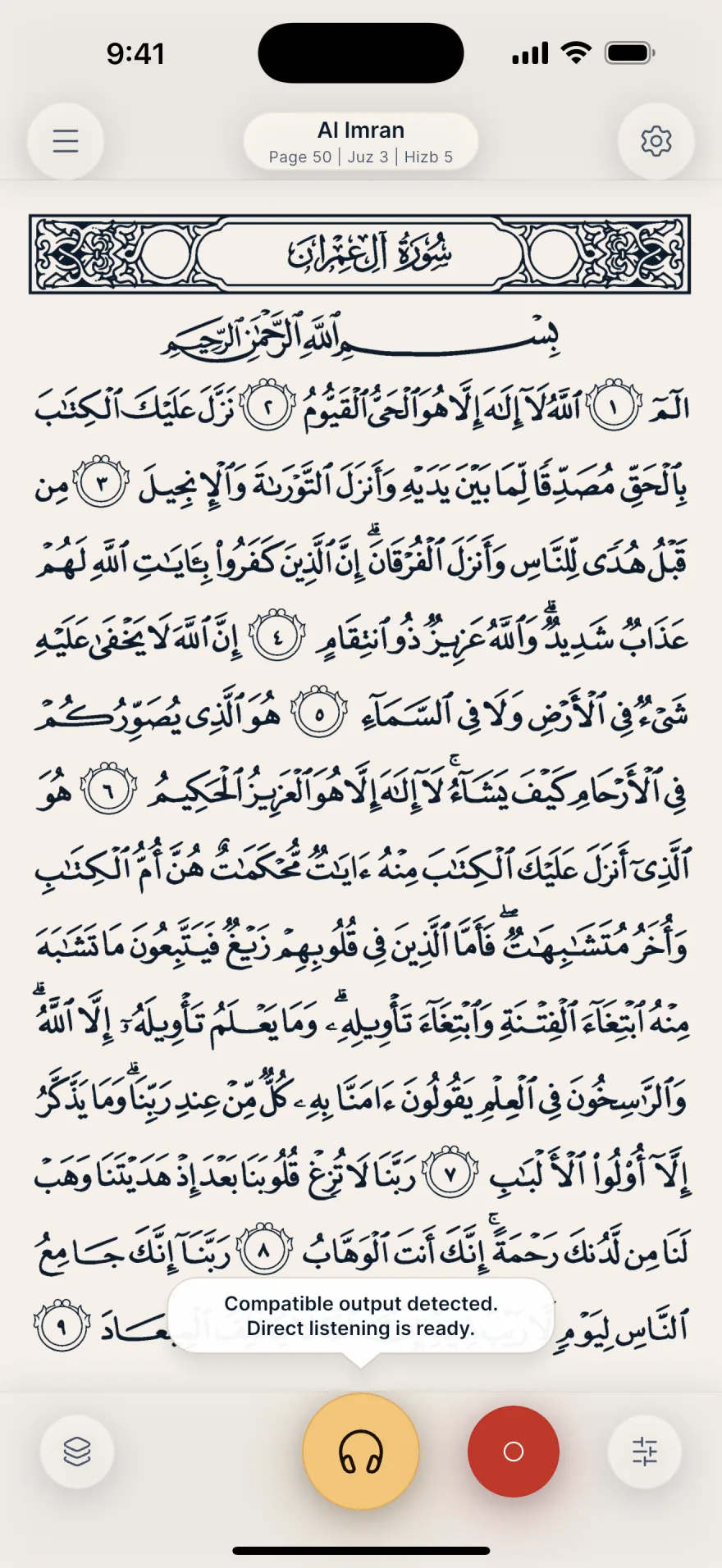
Live Quran recitation with mosque-inspired sound.
Mubayyen applies the selected Mode rendering to your voice. Hear yourself live, replay your recordings, open advanced mode settings and create your own modes, from Natural to more spacious modes.
Record, edit, share or save your Quran recitations.
Real-time direct listening
Hear your processed voice live with a compatible output. Bluetooth is not used for direct listening because of latency; it remains suitable for recording without audible return and replaying.
Record and keep your recitations
Record your recitations, edit them at your own pace, then find them in your Library to organize and replay them.
Share or save your recordings
Save your recitations in very high quality or share them directly with the people and apps you choose.
Your takes stay private
Your recordings stay on your device. An excerpt is sent to support only if you explicitly choose it in an audio issue report, and it is deleted automatically after 30 days.
Edit your Quran recitation audio, from quick to precise.
Start with simple choices for voice and space, then refine every stage of the sound. Reverb and reflections create a natural sense of echo while keeping the recitation true to your voice.
- 01
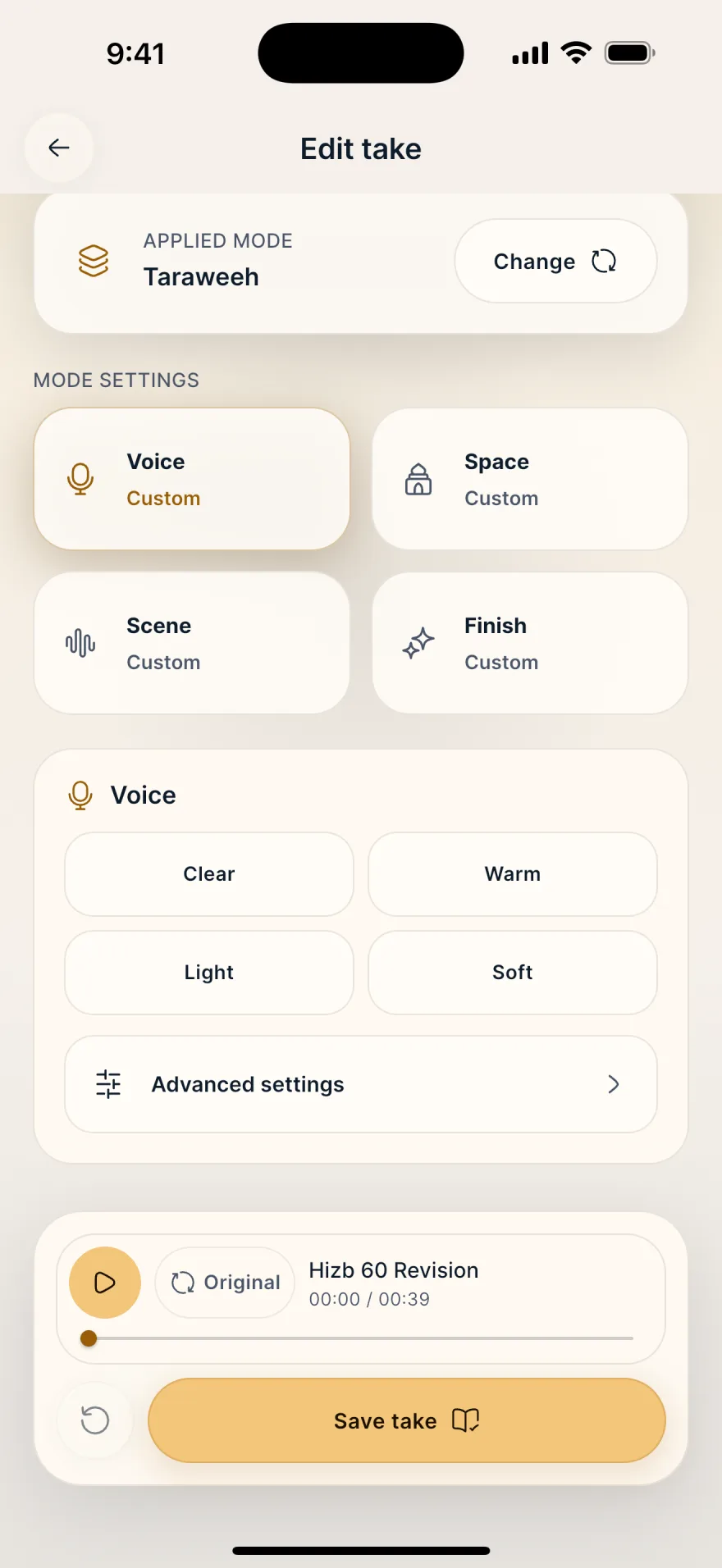
Refine a take in a few taps
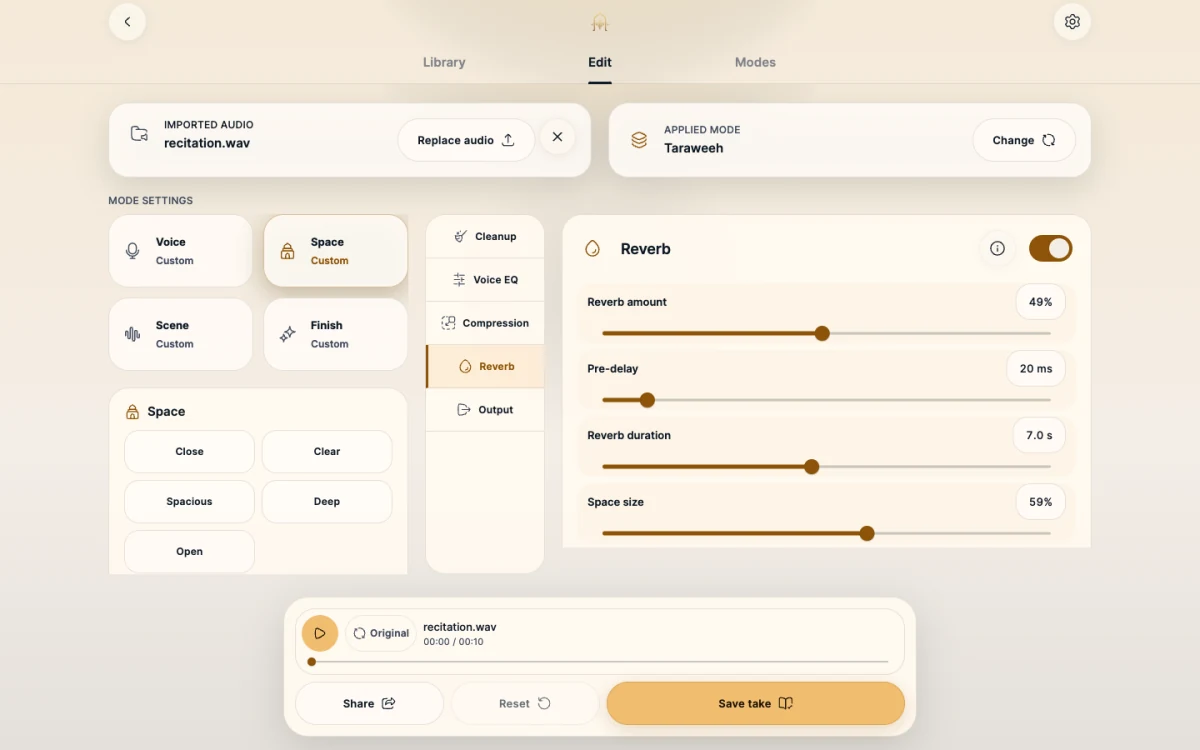
After recording, the Edit take screen shows the Mode applied. Tap Voice, Space, Scene or Finish, pick a character such as Clear or Warm, then compare with the original before saving the take.
- 02
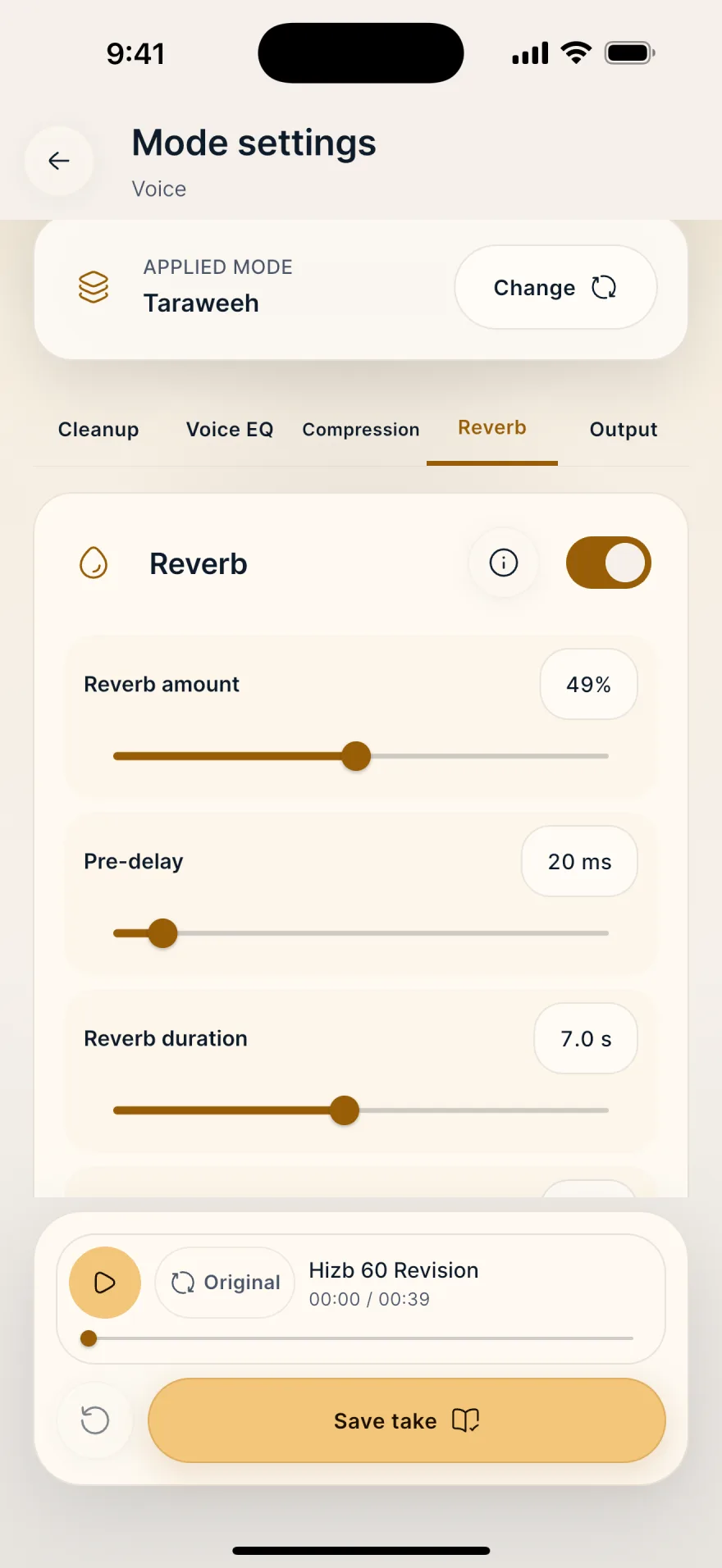
Shape every stage of the sound
Advanced settings lay out the processing chain in tabs: Cleanup, Voice EQ, Compression, Reverb and Output. Adjust amount, length or room size with sliders, then save the result as your own Mode.
- 03
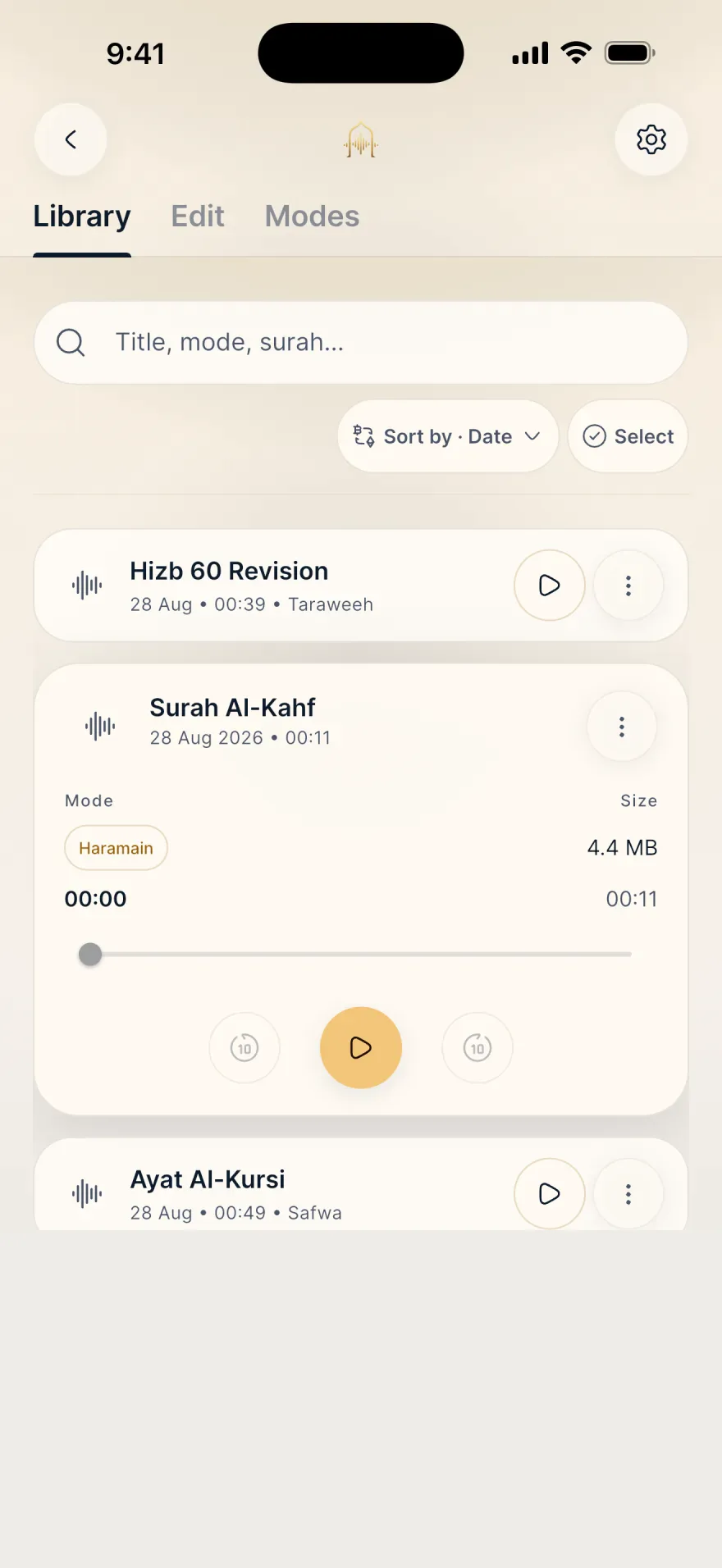
Every take in one place
The Library lists your takes with their date, length and the Mode used. Search by title, sort the list, replay in the built-in player, then share or save a copy.
More room for your recitation.
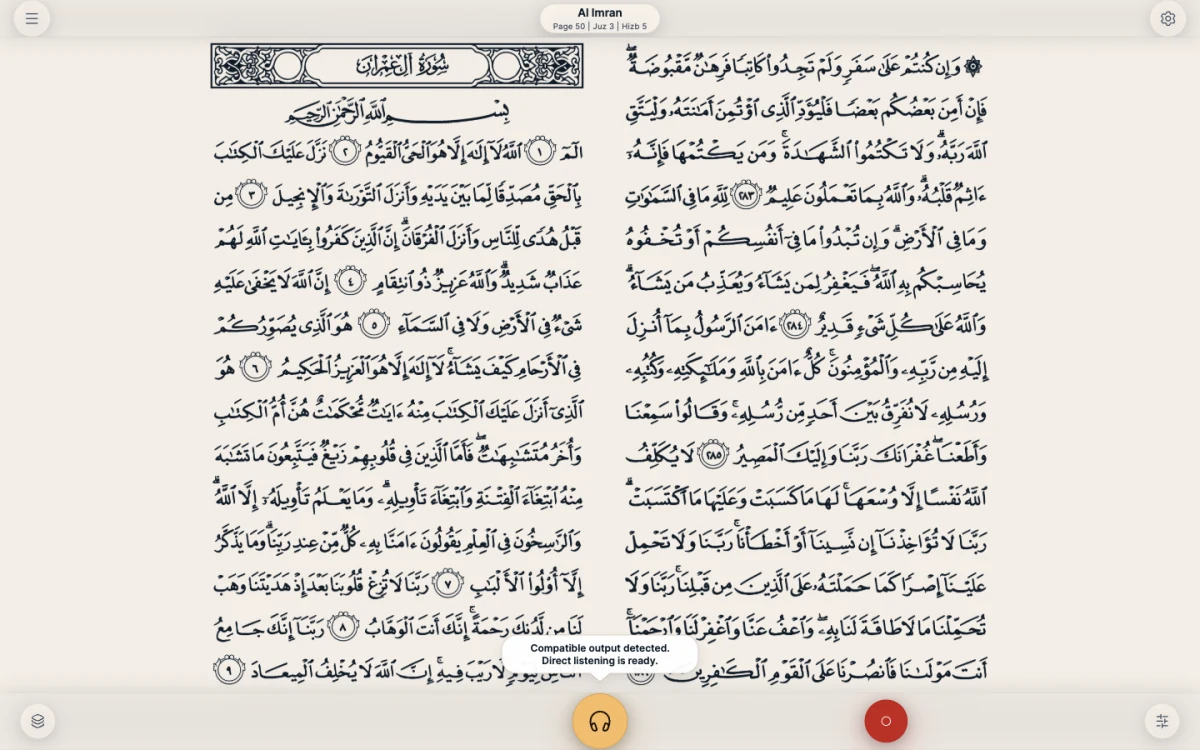
On tablet and Mac, the Mushaf opens as a two-page spread, like a physical mushaf, while sound controls get all the space they need.
Start free. Move to Pro whenever you are ready.
Free includes 3 essential Modes and MP3 for Takes made with a Free or local personal Mode. Pro unlocks all 8 Modes, Advanced, audio import, WAV, and sharing Takes made with a Pro Mode.
Everything you need to listen, record, edit an existing take and export, with no time cap imposed by Mubayyen.
Free forever
- Real-time direct listening
- Recording with no Mubayyen time cap
- Natural, Taraweeh and Haramain modes
- Guided: Voice, Space, Scene, Finish
- Local personal modes
- Library, search and replay
- Share and Save a copy as MP3 for Free or local personal Takes
- Simple editing for existing takes
All of Mubayyen: 8 Modes, Advanced, audio import, WAV, plus Share and Save a copy for Takes made with a Pro Mode.
per month
All of Mubayyen: 8 Modes, Advanced, audio import, WAV, plus Share and Save a copy for Takes made with a Pro Mode.
per year · 7-day free trialjust $3.33 per month
- Everything in Free
- Full catalog of 8 Mubayyen Modes
- Advanced: Cleanup, Voice EQ, Compression, Reverb, Output
- Resonance, separation, stereo width and envelopment
- Create modes from Pro modes
- Set a default Pro mode
- Simple editing for existing takes
- Audio import
- Share and Save a copy as WAV
- Share and Save a copy from a Pro Mode
Compare plans
Essentials
FreeProModes
FreeProSettings, editing and sharing
FreeProNo ads and no hidden subscription. Audio stays on your device unless you explicitly attach an excerpt to an audio issue report.
Audio setup for live listening
Mubayyen is available on Android phones and tablets, iPhone, iPad and Mac. For direct listening, connect a compatible audio output. On mobile, use a real output connected to the device; on macOS, a dedicated output is required. For a cleaner listening experience, choose a quiet place away from surrounding noise, then recite in your real recitation conditions.
iPhone and iPad
On iPhone and iPad, use a compatible audio output connected to the device to hear your voice live with stable return.
Android and Android tablets
On Android phones and tablets, use a recent device with wired headphones, a compatible audio output or a compatible audio interface for the best result.
macOS
On macOS, use a dedicated output: wired headphones or earphones, line out, a DAC, or a dedicated audio interface. Internal speakers, displays, HDMI/DisplayPort, hubs, docks, and USB-C multiport or charging adapters remain blocked.
Bluetooth, AirPods and wireless headphones
Bluetooth and AirPods are not used for direct listening because of latency. They remain suitable for recording without audible return and replaying your takes.
Quran recitation app FAQ
What is Mubayyen?
Mubayyen applies mosque-inspired Modes to your recitation. You hear yourself live, record your Takes, edit them, share them, or save a copy.
Which app can record Quran recitation with reverb and echo?
Mubayyen is a Quran recitation app for iPhone, iPad, Android and Mac that records your voice with mosque-inspired reverb and echo. You hear the result live through a compatible audio output, then edit the take and export it as MP3, or as WAV with Pro.
Which app can I use to edit a Quran recitation audio?
Mubayyen is a Quran recitation app with a built-in audio editor for iPhone, iPad, Android and Mac. Record your recitation in the app, or import an existing WAV, M4A or MP3 file with Pro, then change the Mode and adjust Voice, Space, Scene and Finish. Advanced settings add Cleanup, Voice EQ, Compression, Reverb and Output. Compare with the original, then share or save a copy.
How does Mubayyen work?
For direct listening, connect a compatible audio output. Open the Mushaf, choose a Mubayyen Mode and recite: you hear your voice live with the Mode rendering. You can then record the take, edit it, open advanced mode settings, create your own modes and export the result.
Does Mubayyen correct my recitation or tajweed?
No. Mubayyen is an audio tool for listening to, adding reverb to and recording your voice: it is neither a tajweed-correction tool nor a replacement for a teacher. Before sharing a Quran recitation, make sure the tajweed rules are correctly observed.
Can I use reverb or echo while reciting the Quran?
Mubayyen is an audio tool: it adds listening, echo and reverb rendering to your voice without changing the recited text or correcting tajweed. It does not give religious rulings; for permissibility questions, ask a qualified person.
Does Mubayyen use autotune or a voice changer?
No. Mubayyen does not use autotune, pitch correction or voice transformation. The Modes create mosque-inspired acoustic rendering such as echo, reverb and space.
Can I record Quran recitation with mosque reverb?
Yes. Choose a Mubayyen Mode, use a compatible audio output for live listening, then record your Quran recitation. You can find it in the Library, edit it, and export it as MP3 or as WAV with Pro.
Which devices does Mubayyen support?
Mubayyen is available on Android phones and tablets, iPhone, iPad and Mac.
Is Mubayyen suited to tablets and Mac?
Yes. Mubayyen adapts its interface to Android tablets, iPad and Mac. On iPad and Mac in landscape, the Mushaf is shown as a two-page spread for comfortable, book-like reading.
Do I need an internet connection?
Not for the main features. You can recite, listen live, record and use the Library without a connection. Account, Pro purchases, purchase restoration and some support pages may require a connection.
Is Mubayyen free?
Yes. Mubayyen is free with Natural, Taraweeh and Haramain, simple editing, and MP3 for Takes made with a Free or local personal Mode. Pro unlocks all 8 Modes, Advanced, audio import, WAV, and sharing Takes made with a Pro Mode.
Are Share and Save a copy locked behind Pro?
No. Share and Save a copy follow the same rule: MP3 is included for a Take made with a Free or local personal Mode. WAV and Takes made with a Pro Mode require Pro.
How do I subscribe to Mubayyen Pro?
In the app, open Mubayyen Pro when a Pro offer is shown, then choose the annual or monthly offer when available. Purchase is handled by the App Store or Google Play. Renewal, cancellation and refunds follow the store’s rules; after activation, the app can open native subscription management.
Can I use AirPods or Bluetooth headphones?
Bluetooth and AirPods are not used for direct listening because of latency. They remain suitable for recording without audible return and replaying your takes.
Report an audio issue
Your recordings stay on your device. An excerpt is sent to support only if you explicitly choose it in an audio issue report, and it is deleted automatically after 30 days.
Prepare your recitation with Mubayyen.
Download Mubayyen on Android phones and tablets, iPhone, iPad and Mac for Quran recitation and recording with live listening, reverb, echo and voice effects.