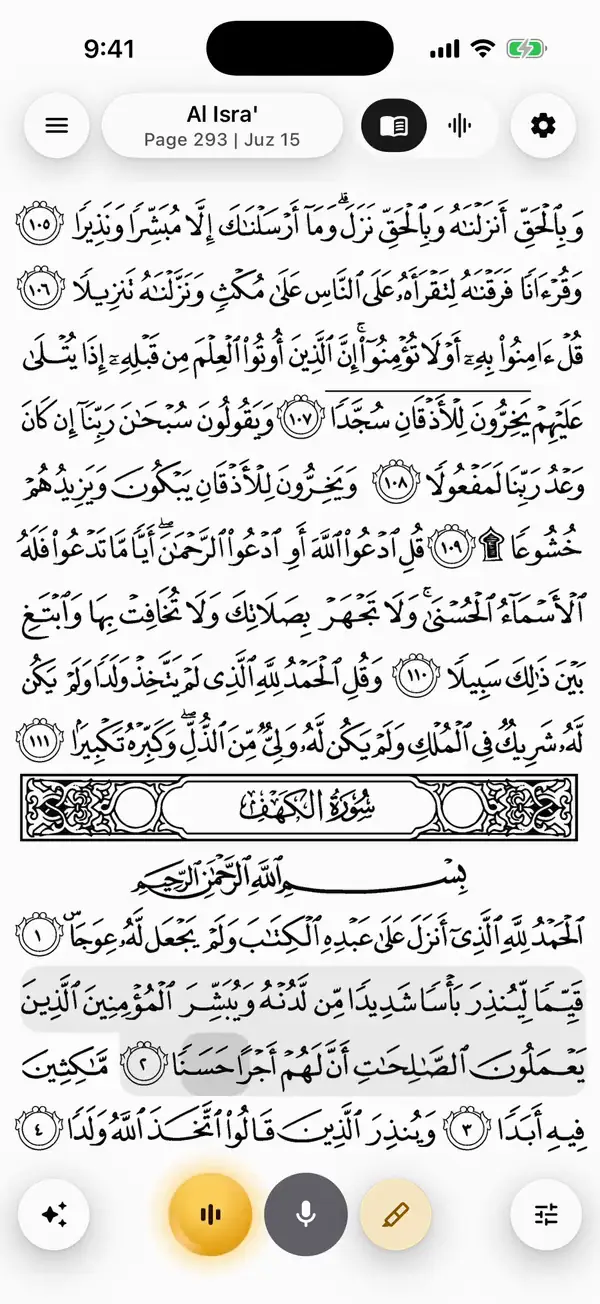
What the on-device AI does
As you recite, the AI that runs on your device recognizes the verse you are on in real time and highlights it in the Mushaf. The page turns by itself, so you can keep reciting without touching the screen.
It is free for everyone and needs no account. Mubayyen's main purpose remains the sound of your recitation: listening, Modes, recording and editing. The recognition goes alongside it.
Recitation alerts: skipped, similar or other verses
Mubayyen notices in real time when you have moved to another verse: a skipped verse, a similar verse (a mutashabih, a verse that looks like another one), another passage or a step back. It then shows where to resume.
This is useful for review and memorization, where it is easy to slip from one similar verse to the next. The alert says where you are in the Mushaf, nothing more.
What it does not do
Mubayyen does not correct your recitation, does not grade it and does not detect mistakes in a word, a letter or a vowel. It does not correct tajweed (the rules of Quran recitation) and does not replace a qualified teacher.
It follows which verse you are reciting. How you recite it stays between you and the person who guides you.
Offline and private
The downloaded Mushaf, the recognition and your recordings are all on your device, so following your recitation works without an internet connection. Buying Pro and backing up an account do need a connection.
Your recordings and imported audio stay on your device by default.
Follow your recitation in 5 steps
- Open Mubayyen and choose the surah or page you want to recite in the Mushaf.
- Pick a Mode, a sound setting for your voice, if you want to hear yourself with a mosque-inspired reverb.
- Press record, or listen live with wired headphones, and start reciting.
- Watch the highlight follow the verse you are on, and the alerts if you skip or switch to a similar verse.
- Stop when you are done. The recording is saved in your Library.
Frequently asked questions
Does the Quran app need internet to follow my recitation?
No. The downloaded Mushaf, the recognition and your recordings are on your device. Buying Pro and backing up an account need a connection.
Is the verse recognition free?
Yes. The on-device recognition of the verse you recite is free for everyone.
Does Mubayyen correct my recitation or my tajweed?
No. It follows which verse you are reciting and highlights it. It does not correct, grade or judge a recitation, and it does not check tajweed.
What happens if I skip a verse or go to a similar one?
A recitation alert tells you in real time that you have moved to another verse, whether skipped, similar, from another passage or earlier, and shows where to resume.
Does my voice leave my phone?
No, not by default. The recognition runs on your device and your recordings stay there.
Try it in Mubayyen
Mubayyen is a Quran recitation app for iPhone, iPad, Mac and Android. Read the Mushaf, record your recitation, track your Khatma, then share or keep your recordings. No ads.