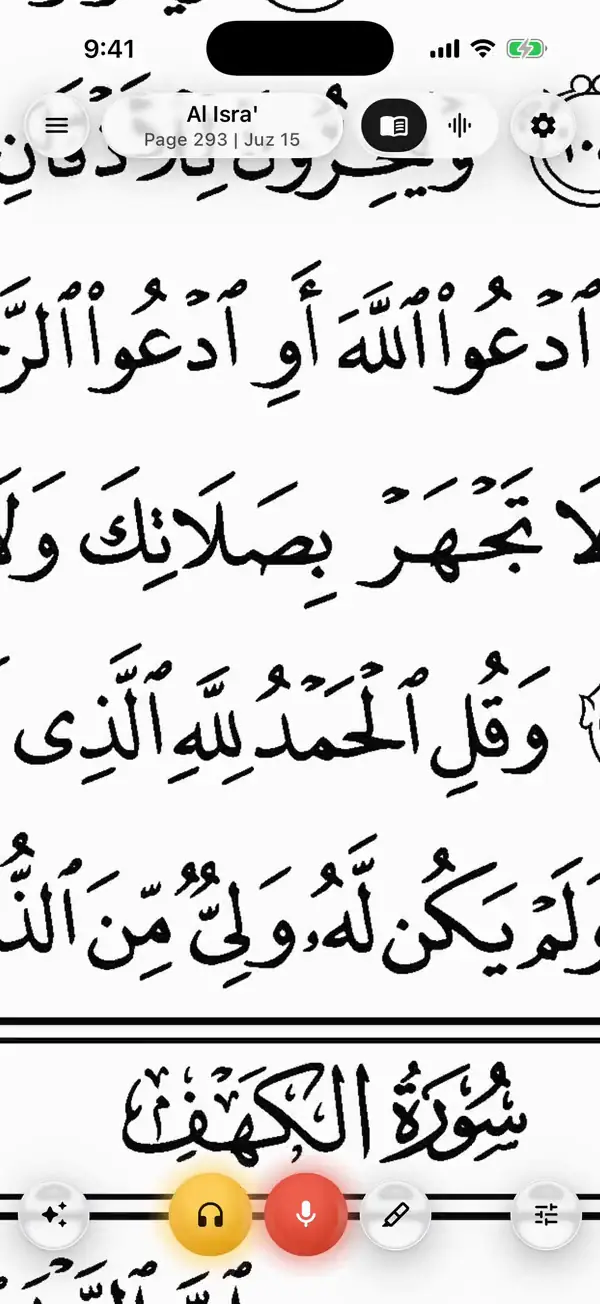
Zoom into the verses
Pinch the page with two fingers to enlarge the verses, and pinch back to return to the normal size. It is a simple way to read the Mushaf at a size that is comfortable for you.
A phone in landscape
Turn your phone to landscape and the page fills the full width of the screen. You can still pinch to zoom in that position.
Two facing pages on a tablet or a Mac
On a tablet in landscape, and on a Mac when the window is wide enough, the Mushaf shows two facing pages like an open book.
Foldable phones
An opened iPhone Duo, or an Android foldable such as the Galaxy Z Fold, shows the Mushaf as two pages side by side. A flip-style foldable is used like a phone.
Zoom and read larger in 5 steps
- Open Mubayyen and choose a surah or a page in the Mushaf.
- Pinch two fingers apart on the verses to enlarge them.
- Turn your phone to landscape for a page that fills the width.
- On a tablet in landscape, or in a wide Mac window, read two facing pages at once.
- Pinch back to return to the normal size whenever you like.
Frequently asked questions
Can I make the Quran text bigger in Mubayyen?
Yes. Pinch the page with two fingers to zoom into the verses, and pinch back to return to the normal size.
Does Mubayyen show two pages at once?
Yes, on a tablet in landscape, on a Mac with a window wide enough and on an opened foldable such as the iPhone Duo. A phone in landscape shows one page that fills the width.
Does it work on foldables like the iPhone Duo or the Galaxy Z Fold?
Yes. Opened, they show the Mushaf as two pages side by side. A flip-style foldable is used like a phone.
Which devices does Mubayyen run on?
iPhone, iPad, Mac, and Android phones and tablets.
Try it in Mubayyen
Mubayyen is a Quran recitation app for iPhone, iPad, Mac and Android. Read the Mushaf, record your recitation, track your Khatma, then share or keep your recordings. No ads.